
eCommerce Shopping Cart Hosting
Testimonials
Looks great!!!!!!!!! …Thanks again, so much!!!!!!!!!!!!!!!!!!!! PS: I already had 2 people ask who did my website, so I referred them to you.
Vikki — Avocado Dreamin’ LLC
Shopping Cart Features
- Easy to Learn
- Browser-based layout makes shop setup easy!
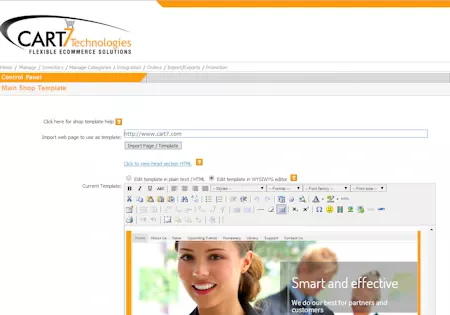
- Use the easy template import feature to make the shop look just like any page on your site. Click here to see the video on the shopping cart template import.
- Use the import function to speed up inventory creation.
- Secure Shopping Cart
- SSL Certificate FREE for all Secure Pages
- 256-BIT SSL ENCRYPTION gives you top notch protection and gives your customers peace of mind!
- The benefits of having an SSL certificate are that your customers can process secure transactions for all their orders.
- Our Servers Backed-up & Scanned Daily!
- Best Value Cart
- Generous Item Limits
- $14.95 a month for Full Featured Shopping Cart that holds up to 5,000 items.
- eCommerce hosting includes Cart plans starting at $19.95 a month that hold up to 1,000 items and more for other plans
- All the Features you need at NO extra charge!
- Unlimited categories and sub-categories
- Unlimited custom fill-in text boxes for message to accompany your items
- Unlimited custom drop down lists for attributes like “size”, “color”, “length”, etc.
- Unlimited thumbnails and images with each item.
- Generous Item Limits
- Custom Design
- You can use any web site design software, and, easily import one of your pages to use as a template into the shopping cart.
- Build your site using your favorite web site design software like:
- WordPress — Shop Plugin Available!
- Dreamweaver
- Adobe GoLive
- Shopping Cart can Import look from any design. You can also get HTML or include code from the shopping cart to place in your website.
- Easy Order Features
- Process Credit/Debit Cards in Real Time
- Process Credit/Debit Cards Manually
- Over 20 Compatible Merchant Gateways
- Recieve Order Notifications via Email
- Optional Account based checkout with Optional Guest Checkout
- Cart is compatbile for Recurring Billing if you use BluePay or Authorize.net as your Credit Card merchant.
- Customize Text on the Secure Checkout pages
- Print multiple invoices at once using the PDF Invoice Generation
- Create customized templates for printing packing list, invoice, and label from orders
- Use PayPal 3rd Checkout Option.
- SEO Friendly
– Search engine friendly category links are based off Category Titles – Search engine friendly item links are based off Category Titles – HTML coding is optmized The title tag corresponds to the category or item. There is an option to customize category tags. The Item page description tags also use the item description. Image Name, Title and Alt tag are all based off Item Title
- Mobile Friendly
Shopping Cart automatically re-sizes your Shop template to fit mobile screen resolutions. Don’t lose anymore cell phone or tablet sales!
Why Choose our Ecommerce Website Hosting?
- US Based Support
Support from our expert team based in California
- Reseller Opportunities
Click the following link for more information on Re-seller Opportunities for our shopping cart and web hosting.
- Web Hosting Features
- WordPress compatible hosting / WordPress installed at no charge.
- Free E3 SSL for your site.
- Easily create a search engine friendly page with links to all your products using the shopping cart’s sitemap feature.
- Make one time buyers into repeat customers using the built in newsletter function
- Easy to use shopping cart: Connect our shopping cart to your existing website hosting.
- QuickBooks Compatible
- Shopping cart is UPS, USPS and FedEx integrated (Real time calculations based on weight, size, and zip code).
- Monitor your search engine success with the full graphical statistics.
- Demo and Clients
- Visit Our Shopping Cart Demo
- View the hosted shopping cart administration area
- See some of our current clients using the Shopping Cart
- Please click below to view a small cross section of the 1000’s of sites using our shopping cart hosting.
- Shopping Cart Appearance
-
- Design your site in WordPress then use our WordPress plugin to display the shop items on your WordPress pages. Or, build your site using your favorite web site design software like Dreamweaver, Adobe GoLive then automatically import one of your pages to use as template. Use the easy template import feature to make the shop look just like any page on your site click here to see the video on the easy template import
- Click to find out more about our Shopping Cart.
-
- Great Value
- Hosting, shopping cart, SSL for secure checkout, and email all in One!
- Our hosting start packages at just $19.95. Compare at $49+ for similar!
- No Setup Fees or Hidden Charges
- Click Here for ecommerce hosting plans details
- Click to find out more about our Shopping Cart
- How to get started
Click here to order Ecommerce Hosting
- Click here to Order your ecommerce web hosting
- Get your passwords and settings and start building your site and adding items to your inventory.
- Order your credit card merchant account (If you do not have it already) from one of the credit card processing providers listed here. (Including Authorize.net, Payflow, and Paypal)
- Link into the shopping cart software software for items you want to sell.
- Give your customers confidence in your site and shopping cart using affiliations with links to organizations like Trust-guard.com and BBBOnline.org
- Optimize your site for search engines and submit it. Export your shop items to the Google Shopping Feeds format and submit your shop items to Google.com/products Also, promote site using pay per click listings from Google.com, Bing Search Marketing
- Set your shopping cart to ask them if they want to subscribe to your newsletter. Then keep in touch using our built in newsletter function! Create promotional codes to reward your past shoppers with discounts or free shipping.
- Sell some of your items on sites like www.ebay.com and Name Your Link Use your follow-up emails, and package inserts with the product to let them know about your site.
- When a customer orders, you will receive a notification and will then be able to log into your shopping cart control panel to read the credit card information and complete order securely from a password protected SSL secure page. Credit cards can be processed in real time using an online gateway, Google Checkout, or Paypal / Paypal Pro Click to find out more about our Shopping Cart.
- SEO Optimized
Want your Shopping Cart to show up in the Search Engines? See a video on how the cart is designed to show up in the search engines
-
- Search engine friendly links for Categories and Items
- Category links include the category name in the actual link
- Category Name: Outdoor Wall Mt. URL: http://shopdemo.cart7.us/category/Outdoor-Wall-Mt.-24
- Item links include the item name in the actual link http://shopdemo.cart7.us/item/Flush-Mount-200
- Category links include the category name in the actual link
- Shopping cart page source built for SEO: In the shipping cart the Title tag, Meta Description, Meta keyword, Alt tags, Item image names, and urls themselves are all automatically optimized.
Click to Find out more about our Shopping Cart.
- Search engine friendly links for Categories and Items
-